That Little Square Does a Lot: How QR Codes Actually Work
From the black-and-white squares on your pizza box to the split-second bank transfer — here's how QR codes and UPI payments actually work under the hood, explained without the jargon.

That Little Square Does a Lot: How QR Codes Actually Work
You've scanned hundreds of them — restaurant menus, bus tickets, payment counters, event passes, Instagram profiles.
You point your phone. Wait half a second. Something happens.
But what is that little square, really? And how does pointing a camera at a printed sticker somehow move money between two bank accounts in under a second?
It turns out this is one of the most elegant pieces of everyday engineering. Once you see how it works, you can't unsee it.
TL;DR
A QR code is just text — encoded as a grid of black-and-white squares. Your camera decodes that grid back into text using math. For payments, that text is a special address that tells your UPI app who to pay and how much. Then five institutions — your bank, NPCI, the merchant's bank, and a couple of others — silently coordinate a real-time transfer in milliseconds. The Soundbox speaks because it keeps a permanent cloud connection open, waiting for exactly that moment.
Chapter 1: What Even Is a QR Code?
Let's start with the simplest possible explanation.
A QR code is just text, printed as a picture.
That's it. Everything else is engineering detail on top of that single idea.
Instead of writing upi://pay?pa=chaiwala@upi&am=50, someone converts that string into a grid of black and white squares. When you point a camera at that grid, the phone runs some math and gets the text back out.
 Every zone has a job: corner squares for orientation, tiny dots for grid calibration, everything else is data. Source: Wikimedia Commons (CC BY-SA 3.0)

Why squares? Why not just a regular barcode?
A regular barcode — the zebra-striped one on a cereal box — only stores data in one direction, horizontally. It's like a single line of text. That limits it to maybe 20-30 numbers.
A QR code uses both dimensions. Horizontal and vertical. Think of it as a page of text versus a single line. Same physical space, but now you can pack in 4,000+ characters.
This is what made QR codes revolutionary when Denso Wave invented them in 1994 — originally just to track car parts in a Toyota factory. Nobody imagined they'd end up on every restaurant table on Earth.
Chapter 2: The Anatomy — What Are All Those Squares For?
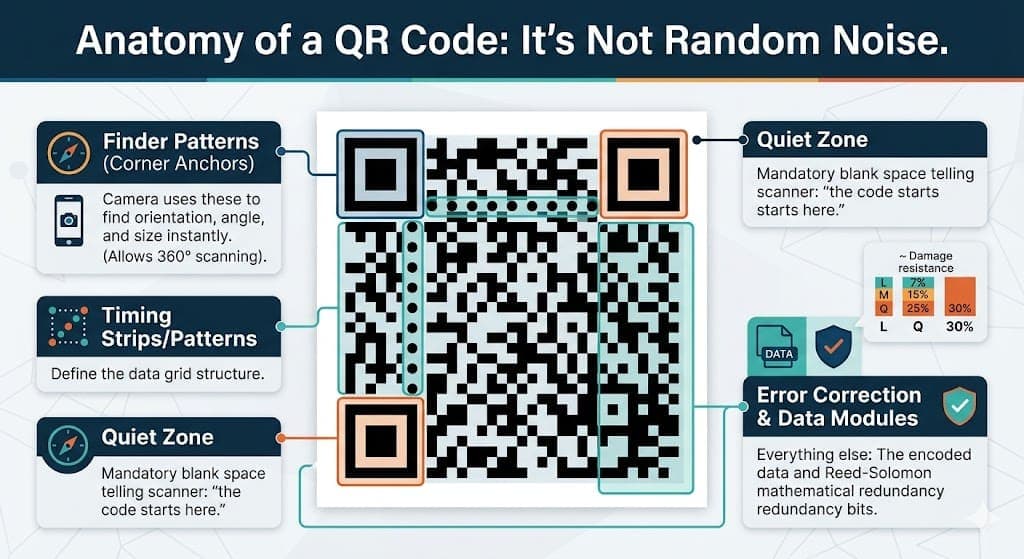
Look closely at any QR code. You'll notice it's not random noise. It has a very specific structure.
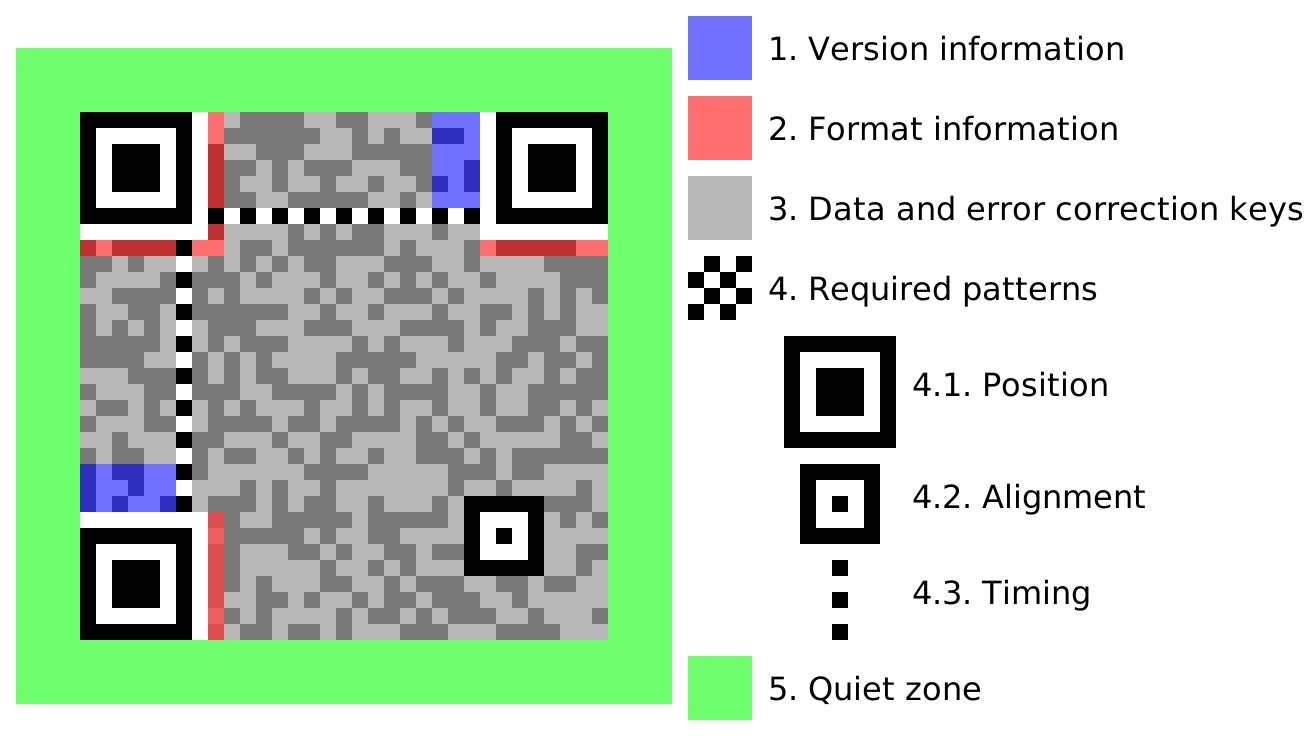 It's not random noise — every region is precisely defined by the ISO standard. Source: Wikimedia Commons (CC BY-SA 3.0)

The three big squares in the corners
Those three bold nested squares — top-left, top-right, bottom-left — are not data. They're navigation anchors.
Your phone's camera finds these three squares first, before reading anything else. Once it locates them, it instantly knows:
- Where the QR code starts and ends
- What angle it's tilted at
- How large each data "cell" is
- Whether the image is distorted or curved
This is why you can scan a QR code:
- Sideways
- At an angle
- Upside down
- Printed on a curved bottle
- Slightly crumpled
The three anchor squares let the software mathematically "flatten" the image before reading the data cells.
The tiny dots in the middle — the data
Everything between and around the anchors is actual data: the encoded text, plus extra redundancy bits for error correction.
The quiet zone
Notice how QR codes always have a white border around them? That blank space isn't wasted — it's mandatory. It tells the scanner "the code starts here." Without it, the camera can't distinguish the code from whatever is printed around it.
Chapter 3: What Happens When You Scan?
Here's the sequence that happens the moment you point your camera at a QR code:
1. The camera captures a frame and converts it to black-and-white. No colour needed. Just dark and light.
2. Software scans for the three corner anchors. It's looking for the specific pattern of that nested square. Once it finds three of them, it locks on.
3. It maps the grid. Using the anchor positions and the thin "timing strips" between them (those alternating rows of dots), the software figures out where every data cell is and reads each one as a 0 or 1.
4. It reverses a mathematical mask. During QR code creation, the data gets scrambled with an XOR mask to prevent large uniform patches of black or white (which confuse cameras). The scanner reverses this.
5. Error correction runs. If a few cells were smudged or misread, a Reed-Solomon algorithm reconstructs the original data. This is the same math NASA used for deep-space probes and CDs use for skipping prevention.
6. Output: plain text. The whole thing — from camera frame to decoded string — takes milliseconds.
Chapter 4: The Error Correction Magic
This part deserves its own section because it's genuinely remarkable.
A QR code can be physically damaged — torn, smudged, covered by a logo — and still decode perfectly.
 Wikipedia's own QR code has its logo sitting right in the middle — covering real data cells. It still scans perfectly because error correction fills in what's missing. Source: Wikimedia Commons (public domain)

There are four levels of error correction you can choose when generating a QR code:
| Level | Survives this much damage |
|---|---|
| L (Low) | ~7% |
| M (Medium) | ~15% |
| Q (Quartile) | ~25% |
| H (High) | ~30% |
Payment QR codes often use level H — so even if 30% of the squares are destroyed, the data is fully recoverable.
The math behind this (Reed-Solomon codes) operates on something called a Galois Field — a finite number system where all arithmetic "wraps around." It's the same fundamental idea used in RAID storage arrays and satellite communications. The QR code on your chai stall's counter uses mathematics built for outer space.
Chapter 5: Static vs Dynamic — Two Very Different Beasts
Not all payment QR codes work the same way. There are two fundamentally different types.
The printed sticker on the counter — Static QR
That laminated card at your local vegetable vendor? That's a static QR code.
It was generated once during merchant onboarding, printed, and it never changes. It only stores the merchant's UPI address — something like vendor@oksbi. When you scan it, your UPI app opens and asks you to type the amount yourself.
The good: It's cheap to produce, requires no internet connection to display, and lasts indefinitely.
The problem: You type the amount. You might type ₹100 when you owe ₹1,000. The merchant has no way to pre-confirm the correct amount. Reconciling which payment matched which order is a manual headache.
The screen at a restaurant — Dynamic QR
At a modern restaurant, grocery store, or any POS system, the QR code is generated fresh for every single transaction.
You scan it and your UPI app already shows: "Pay ₹847 to Domino's Koramangala." Pre-filled. No manual entry. One fingerprint, PIN, done.
This QR is generated live by the payment aggregator's backend (PhonePe Business, Razorpay, Paytm for Business, etc.) and encodes:
- Merchant's UPI address
- Exact transaction amount
- A unique order reference ID
- An expiry timestamp (usually 10-15 minutes)
Scan a day-old dynamic QR code and it rejects. This is intentional — expired codes can't be replayed or reused by anyone.
Chapter 6: The Payment Journey — Half a Second, Five Institutions
Here's the part most people never think about: what happens after you tap "Pay."

The chain of events
Your phone reads the QR code and finds this text:
upi://pay?pa=merchant@bank&pn=Store Name&am=150.00&tr=ORD123456
Your phone sees upi:// and immediately knows — same way mailto: opens your email app — to launch your UPI payment app. This is called deep linking.
You enter your PIN. But it never travels in plain text.
Every UPI app — Google Pay, PhonePe, Paytm — embeds a locked-down cryptographic module called the NPCI Common Library. It's a piece of isolated code that every UPI app is legally required to include.
When you type your PIN, it goes into this vault:
- Mixed with device-specific values
- Hashed (converted into an irreversible fingerprint)
- Wrapped in multiple layers of encryption
Think of it this way: your PIN gets locked inside a box. That box gets locked inside another box. The second box's key is held by your bank — and only your bank.
PhonePe never sees your PIN. NPCI never sees your PIN. Nobody in the middle can.
The encrypted package travels a fixed route:
Your phone
  → PhonePe's servers
    → Your bank (the Payer PSP)
      → NPCI UPI Switch
        → Merchant's bank (the Payee PSP)
Each hop verifies the cryptographic integrity before passing it along. Nobody can tamper with the amount or the recipient mid-flight.
NPCI is the air traffic controller.
The NPCI Switch sits at the center. It:
- Decrypts the outer routing layer
- Looks up what bank account
merchant@bankbelongs to - Forwards the PIN payload only to your bank (which holds the only key)
- Waits for your bank to confirm the debit
- Tells the merchant's bank to credit the account
- Broadcasts SUCCESS to everyone
Your bank is the only entity that can decrypt your PIN and verify it. If it matches and balance is sufficient, the debit happens. Signal flows back up the chain.
Total time: typically 200–800 milliseconds.
Chapter 7: Why Does the Soundbox Speak Instantly?
This is the detail that surprises most people.
The Soundbox at the counter isn't checking its inbox every second. It isn't waiting for an SMS. It maintains a permanent open connection to the payment aggregator's cloud servers — like a phone call that's always on hold, never hanging up.
The protocol used for this is called MQTT (Message Queuing Telemetry Transport) — originally designed for oil pipeline sensors in remote locations where bandwidth is expensive. It's extremely lightweight, works over 2G/3G, and keeps the connection alive with tiny "are you there?" heartbeat packets.
The moment NPCI confirms the credit:
- PhonePe's backend fires a notification to the Soundbox's cloud channel
- MQTT delivers it in milliseconds over the persistent connection
- The Soundbox lights its green LED
- It plays audio assembled from pre-stored clips:
[jingle] + ["ek sau pachaas"] + ["rupaye"] + ["praapt hue"]
That slightly robotic quality in the voice? That's because it's stitching together pre-recorded number clips, not synthesising speech from scratch.
Chapter 8: What Stops Someone from Making a Fake QR Code?
This is a real attack. It's called "QR code overlay fraud" — someone prints a QR code pointing to their own account and pastes it over the merchant's legitimate code.
You scan it. Looks identical. Money goes to the wrong person.

To combat this, UPI payment QR codes include a cryptographic signature — a mathematical fingerprint generated using the merchant's private encryption key.
When your UPI app scans a payment code:
- It reads the full URL
- It verifies the signature against NPCI's public key registry
- If the signature doesn't match — even one character was changed — the transaction is blocked immediately
A fraudster can copy a QR code and print it. But they cannot fake the cryptographic signature without the merchant's private key. The math makes forgery detectable.
The Bigger Picture
What began as a Toyota factory tool for tracking car components in 1994 is now the physical-to-digital gateway for one of the world's largest payment networks — handling half a billion users and billions of monthly transactions.
Every time you scan and pay, you're triggering:
- A camera doing real-time computer vision
- Reed-Solomon error correction reconstructing possibly-damaged data
- Deep linking routing your OS to the right app
- A cryptographic vault protecting your PIN from everyone, including the app itself
- Five institutions coordinating an inter-bank transfer in milliseconds
- An IoT device playing spliced audio over a connection that never closes
All in under a second. From a little black-and-white square on a laminated card.
Further Reading
If this sparked curiosity, here's where to go next:
On QR Codes:
- QR Code — Wikipedia — The full history, Denso Wave origins, and technical evolution
- Reed–Solomon error correction — Wikipedia — The math that makes smudged codes readable
- Reed–Solomon codes for coders — Wikiversity — Hands-on if you want to implement it
- ISO/IEC 18004 standard overview — ANSI Blog — The formal spec in readable form
On UPI & Payments:
- Unified Payments Interface — Wikipedia — The full architecture and history
- How UPI powers Scan & Pay — Paytm Blog — The four-party model explained
- Security Analysis of UPI and Payment Apps in India — USENIX — Academic deep dive into UPI security
- UPI Common Library Specification — Razorpay Docs — How the PIN encryption actually works
On the IoT side:
- How Payment Soundbox Works — EazyPay Tech — Full breakdown of the Soundbox hardware and pipeline
- MQTT Protocol — The lightweight protocol that connects Soundboxes to the cloud
Go deeper into system design:
- The System Design Behind PhonePe's UPI Engine — Database sharding, consistent hashing, Raft consensus
The next time the Soundbox speaks, you'll know exactly what just happened — and how many pieces had to work perfectly for that half-second to feel effortless.
Share this post
Enjoyed this one?
Get new deep dives on backend, distributed systems, and AI engineering — no noise, unsubscribe anytime.

Backend engineer at Initializ.ai — building scalable systems with Go, Elixir, and Kubernetes. Writing about distributed systems, AWS, and the bugs that cost me hours.